Rabu, 20 Maret 2013

JARKOM 3

tugas 1 jarkom 3


No
Perintah Penuh
Perintah Singkat
Maksud Perintah
1
show running-config
sh ru
Menampilkan konfigurasi yang sedang berjalan di RAM. Termasuk host name, passwords, interface IP addresses, routing protocol yang aktif, DHCP dan konfigurasi NAT. Dapat dijalankan di EXEC mode.
2
show startup-config
sh st
Menampilkan konfigurasi yang sedang berjalan di NVRAM. Termasuk host name, passwords, interface IP addresses, routing protocol yang aktif, DHCP dan konfigurasi NAT.
3
show version
sh ver
Menampilkan informasi tentang versi software yang sekarang sedang jalan lengkap dengan informasi hardware dan devicenya.
4
show ip protocols
sh ip pro
Menampilkan status interface IP baik secara global maupun khusus dari protokol yang terkonfigurasi pada saat ini (konfigurasi IP awal).
5
show ip route
sh ip ro
Menampilkan Konfigurasi IP yang dilakukan baik secara global maupun secara khusus dari router. Baik berupa configurasi IP pada FastEthernet0/0 maupun pada IP Serial2/0
6
show interfaces
sh int
Untuk menampilkan statistic semua interface router mulai dari FastEthernet dan Serial. Untuk menampilkan statistic interface tertentu, menggunakan perintah show interfaces diikuti dengan nomor port/slot interface,
7
show ip interface brief
sh ip int br
Menampilkan Konfigurasi pada interface yang terhubung pada router. Baik konfigurasi yang sedang berjalan maupun yang konfigurasi yang tidak berjalan (belum terkonfigurasi). Pada perintah ini kita dibawa untuk mengetahui : Interface, IP-Address, Method, Status, Protocol
8
show protocols
sh prot
Menampilkan status interface baik secara global maupun khusus dari protokol layer 3 yang terkonfigurasi.
9
show cdp neightbors
sh cdp ne
Untuk mengetahui Capability Codes, yang meliputi : R (Router), T (Trans Bridge), B (Source Route Bridge), S (Switch), H (Host), I (IGMP), r (Repeater), P (Phone). Selain itu juga digunakan untuk mengetahui
Device ID diantaranya : Local Intrfce, Holdtme, Capability, Platform, Port ID
10
show sessions
sh ses
Untuk mengetahui koneksi yang sedang berjalan (koneksi yang di buka)
11
show ssh
sh ss
Untuk melakukan koneksi dengan server SSHv2 dan SSHv1
12
ping
pi
Untuk melakukan / melihat koneksi antar jaringan yang sedang berhubungan. Perintah ping harus diikuti address or hostname. Contoh ; ping 192.168.0.2
13
traceroute
tra
Untuk mengirimkan secara serempak sebuah urutan paket dengan menambahkan nilai TTL (Time to Live). Ketika sebuah router lanjutan menerima sebuah paket terusan, maka akan mengurangi nilai TTL sebelum meneruskan nya ke router berikutnya. Perintah trace diikuti oleh address or hostname

Kamis, 18 Oktober 2012


A. LANGKAH TOPOLOGI

1.      Alat yang dibutuhkan :
a.       Siapkan 4 PC Komputer
b.      Siapkan 2 Switch
c.       Siapkan 1 Router

2.      Dengan Setting Sebagai Berikut :
NO
NAMA
IP ADDRESS
SUBNETMASK
GATEWAY
1.
PC0
10.0.0.1
255.0.0.0
10.0.0.5
2.
PC1
10.0.0.2
255.0.0.0
10.0.0.5
3.
PC2
192.168.1.1
255.255.255.0
192.168.1.5
4.
PC3
192.168.1.1
255.255.255.0
192.168.1.5
5.
Router
Eth0 = 10.0.0.5
255.0.0.0
-
Eth1 = 192.168.1.5
255.255.255.0
-

3.      Skema Topologi :


B. SINTAK/ COMMAND LINE INTERFACES

System Bootstrap, Version 12.1(3r)T2, RELEASE SOFTWARE (fc1)
Copyright (c) 2000 by cisco Systems, Inc.
cisco 2811 (MPC860) processor (revision 0x200) with 60416K/5120K bytes of memory

Self decompressing the image :
########################################################################## [OK]
              Restricted Rights Legend

Use, duplication, or disclosure by the Government is
subject to restrictions as set forth in subparagraph
(c) of the Commercial Computer Software - Restricted
Rights clause at FAR sec. 52.227-19 and subparagraph
(c) (1) (ii) of the Rights in Technical Data and Computer
Software clause at DFARS sec. 252.227-7013.

           cisco Systems, Inc.
           170 West Tasman Drive
           San Jose, California 95134-1706

Cisco IOS Software, 2800 Software (C2800NM-ADVIPSERVICESK9-M), Version 12.4(15)T1, RELEASE SOFTWARE (fc2)
Technical Support: http://www.cisco.com/techsupport
Copyright (c) 1986-2007 by Cisco Systems, Inc.
Compiled Wed 18-Jul-07 06:21 by pt_rel_team
Image text-base: 0x400A925C, data-base: 0x4372CE20

This product contains cryptographic features and is subject to United
States and local country laws governing import, export, transfer and
use. Delivery of Cisco cryptographic products does not imply
third-party authority to import, export, distribute or use encryption.
Importers, exporters, distributors and users are responsible for
compliance with U.S. and local country laws. By using this product you
agree to comply with applicable laws and regulations. If you are unable
to comply with U.S. and local laws, return this product immediately.

A summary of U.S. laws governing Cisco cryptographic products may be found at:
http://www.cisco.com/wwl/export/crypto/tool/stqrg.html

If you require further assistance please contact us by sending email to
export@cisco.com.
cisco 2811 (MPC860) processor (revision 0x200) with 60416K/5120K bytes of memory
Processor board ID JAD05190MTZ (4292891495)
M860 processor: part number 0, mask 49
2 FastEthernet/IEEE 802.3 interface(s)
239K bytes of non-volatile configuration memory.
62720K bytes of  ATA CompactFlash (Read/Write)
Cisco IOS Software, 2800 Software (C2800NM-ADVIPSERVICESK9-M), Version 12.4(15)T1, RELEASE SOFTWARE (fc2)
Technical Support: http://www.cisco.com/techsupport
Copyright (c) 1986-2007 by Cisco Systems, Inc.
Compiled Wed 18-Jul-07 06:21 by pt_rel_team


         --- System Configuration Dialog ---

Continue with configuration dialog? [yes/no]: n


Press RETURN to get started!


Router>enable
Router#configure terminal

Enter configuration commands, one per line.  End with CNTL/Z.
Router(config)#interface FastEthernet0/0
Router(config-if)#ip address 10.0.0.5 255.0.0.0
Router(config-if)#no shutdown

%LINK-5-CHANGED: Interface FastEthernet0/0, changed state to up
%LINEPROTO-5-UPDOWN: Line protocol on Interface FastEthernet0/0, changed state to up
Router(config-if)#
Router(config-if)#exit
Router(config)#interface FastEthernet0/1
Router(config-if)#ip address 192.168.1.5 255.255.255.0
Router(config-if)#no shutdown

 %LINK-5-CHANGED: Interface FastEthernet0/1, changed state to up
%LINEPROTO-5-UPDOWN: Line protocol on Interface FastEthernet0/1, changed state to up
Router(config-if)#


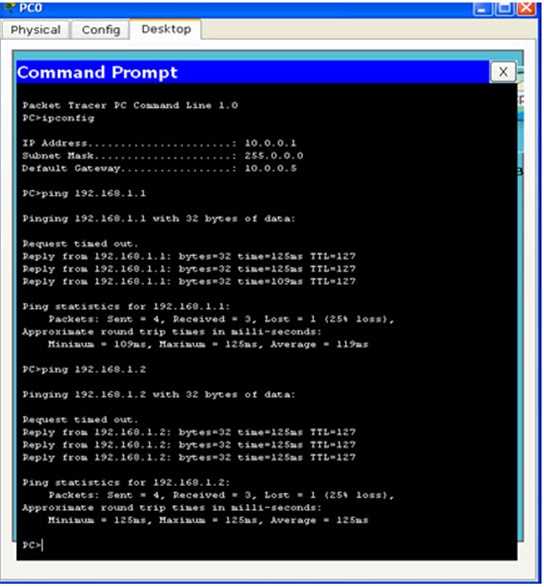
C. UJIAN (PING)

      1. Dari PC0 ke PC1 dan PC3


    2. Dari PC3 ke PC2 dan PC1


Kamis, 11 Oktober 2012

konfigurasi Router


NO
PERINTAH PENUH
PERINTAH SINGKAT
FUNGSI PERINTAH
1
Show startup-config
Sh st
Menampilkan isi file konfigurasi yang tersimpan di NVRAM
2
Show running-config
Sh ru
Menampilkan konfigurasi yang sedang berjalan di RAM. Termasuk hostname,passwords,interface IP addresses,routing protocol yang aktif,DHCP dan konfigurasi NAT
3
Show interfaces
Sh in
Menunjukkan interface yang berjalan di router
4
Show arp
-
Menampilkan dan memodifikasi resolusi alamat
5
Show IP route
Sh ip ro
Memperlihatkan konfigurasi routing
6
Show users
Sh u
Menampilkan seluruh user yang terhubung ke router
7
Show versions
Sh v
Menampilkan informasi tentang versi software yang sekarang sedang berjalan, lengkap dengan informasi hardware dan devicenya